


True Tie: Tie Knot Guide
4.750.00 Reviews
App Specs
- Version
- 8.1
- Updated On
- License
- Free
- Downloads
- 50,000+
- Developer
- Twin Brothers Payam & Peyman
- Categories
- Beauty
- Platform
- Android
Screenshots
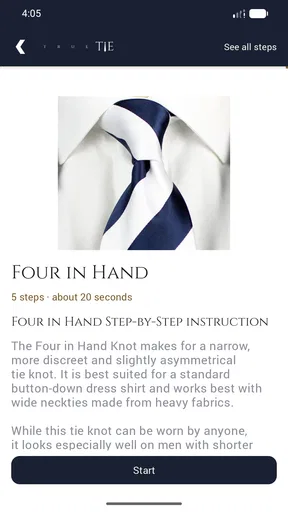
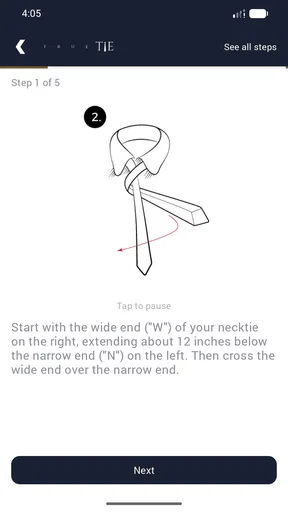
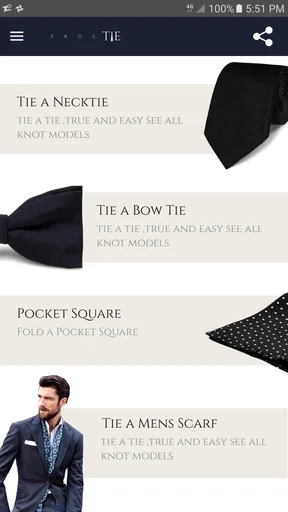
 Analysis by AppCompare
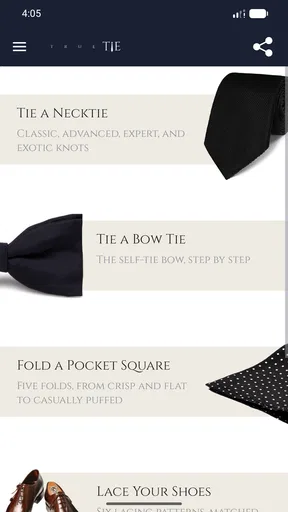
I downloaded True Tie: Tie Knot Guide expecting a small reference tool, and that is exactly what it feels like: focused, practical, and easy to open when clothing suddenly requires a little more confidence. It belongs to the beauty category, but its usefulness is really about personal presentation. Instead of trying to turn dressing well into a social feed or a shopping experience, it concentrates on showing how to tie neckties, bow ties, scarves, and shoe laces.
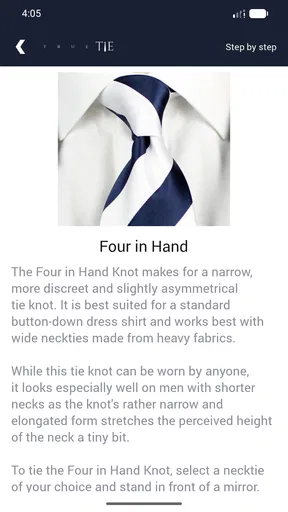
My first impression was that this is the kind of app that seems most valuable when you need it immediately. You may be getting ready for an interview, preparing for a formal dinner, packing for a wedding, or simply trying to stop making the same loose knot every morning. The visual, step-by-step approach makes the learning curve less intimidating than reading written instructions, especially when your hands are already occupied with fabric.
How the first week feels in real use
During the first week, the appeal comes from the app’s narrow purpose. I did not have to search through unrelated style articles or watch a long video before reaching the actual technique. I could choose a type of knot or lacing method and follow the sequence at my own pace. That matters because tying something around your neck or threading laces is a physical task; a clear visual guide is more useful than a paragraph describing left, right, over, and under.
The app covers more than ordinary necktie knots, which gives it a broader role than its short name might suggest. Bow ties are useful for formal occasions, scarves make the guide relevant beyond office clothing, and shoe lacing adds a practical everyday category. I especially like that combination because it turns the app from a one-event download into a compact reference for several small presentation problems.
The offline approach is one of its strongest practical qualities. I could imagine using it while getting dressed in a hotel room, backstage before an event, or in a changing area where the connection is unreliable. A guide that only works when a page loads or a video buffers is frustrating at exactly the moment you need it. Here, the material is designed to remain available, so the app feels more like a pocket instruction manual than a web search shortcut.
New users should not expect a fully interactive tutor that watches their hands and corrects every mistake. The learning still depends on comparing the picture with what you are doing. I found it helpful to pause after each movement, keep the loose ends visible, and restart rather than trying to rescue a knot that had already become confusing. That small habit saves time and prevents the common mistake of repeating the wrong step several times.
For a realistic everyday scenario, imagine receiving a last-minute invitation to a formal event. You own a tie and perhaps a bow tie, but you only know one unreliable knot. Instead of asking someone nearby or searching through several pages of mixed advice, you can open this guide, place the phone beside a mirror, and work through the sequence slowly. The app does not remove the need for practice, but it reduces the embarrassment and uncertainty of starting from memory.
Worth Reading Before You Choose

EA SPORTS FC Mobile 26 Is a Bigger Football Game, but It Takes Time

Flipboard Shows What News Apps Must Do Beyond the Feed

Switching to Android Auto Means Rethinking Your Driving Routine

Google Calendar Makes a Crowded Week Easier to Manage

Ludo King Makes the Most of the Minutes Between Plans

Baby Panda World Brings Quick Play to Modern Phones, but Its Game Library Feels Busy
The same workflow works for a parent helping a child prepare for a ceremony, a student getting ready for an interview, or someone learning to lace shoes in a less ordinary pattern. I would keep the phone on a nearby surface rather than holding it in one hand while tying with the other. That sounds obvious, but it makes a real difference: the guide is clearest when you can look, perform one movement, and look again without juggling the device.
Its audience is also wider than people who wear suits every day. Someone who rarely dresses formally may benefit more than an experienced professional because the app can be opened only when needed. The age rating is Everyone, which fits the simple instructional purpose. The developer is listed as Twin Brothers Payam & Peyman, and the app has been available since October 19, 2016, giving it the feel of a long-standing reference rather than a temporary style trend.
What becomes useful after the novelty fades
The first-week excitement naturally declines because tying a knot is not an endlessly changing activity. That is not necessarily a weakness. A reference tool does not need to entertain me every day if it remains dependable when a specific need returns. The more important question is whether I would remember it exists months later, and I think the answer is yes for occasional formalwear users.
The recurring value comes from repetition with gaps. I may learn a knot once, forget part of it after several weeks, and then need a quick refresher before another event. In that situation, an offline visual sequence is more useful than relying on memory or trying to identify a trustworthy tutorial again. The app earns space by shortening that return-to-skill process.
There is also a useful distinction between learning one method and choosing the right method for a situation. A compact knot may suit a narrow collar, while a fuller shape may look better with a wider collar or heavier fabric. I would not treat the app as a fashion authority that decides what is universally correct. Instead, I would use it to learn the mechanics, then judge the result in a mirror. Proportion, fabric thickness, collar shape, and personal preference still matter.
That is one of the app’s hidden strengths: it encourages observation rather than blind repetition. If a knot looks lopsided, the answer is not always to pull harder. Sometimes the starting lengths were uneven, or the final tightening was done from the wrong side. I found that checking the initial setup carefully had more impact than rushing through the later steps. Beginners often focus on the final shape, but the first positioning determines how much material remains for the finish.
For bow ties, patience becomes even more important. The movement sequence can feel awkward because both sides need to remain balanced while the center gathers. I would practice with a less delicate bow tie first, preferably in front of a mirror, and use the guide to understand the order of movements rather than trying to copy the finished appearance immediately. This is a good example of where the app supports practice but cannot replace it.
The shoe-lacing material may have the most lasting everyday value because shoes are used more often than formal accessories. Alternative lacing patterns can change the look of ordinary footwear, but they can also affect how easily the shoe tightens or loosens. I would test a new pattern during a short walk before using it for a long day. A visually interesting arrangement is not automatically comfortable, secure, or convenient.
Scarves create a similar trade-off. A wrap that looks tidy in an illustration may behave differently with thick winter fabric, slippery material, or a short scarf. I would use the guide as a starting point, then adjust the tension and number of turns to suit the actual garment. That flexibility is important because visual instructions can show a clean example while real fabric has its own weight and movement.
The app’s rating is a 4.7 average from around 1.1 thousand ratings, and it has passed 50 thousand installs. Those figures suggest that many people find the focused approach worthwhile, but they do not change my main assessment: its value depends on whether you prefer a quiet reference guide to a more elaborate style platform. I would not install it expecting a daily stream of inspiration. I would install it for reliable access to instructions when a small clothing task becomes unexpectedly important.
Where maintenance is easy, and where attention is still required
Maintenance is one of the app’s best qualities because there is very little behavioral maintenance involved. It does not ask me to build a profile, follow creators, organize a wardrobe, or keep up with a content feed. The current version is 8.1, and the minimum operating system is Android 6.0, so it is positioned to work on a broad range of Android devices. For me, that supports its role as a utility that can remain installed without demanding regular attention.
The free price also makes keeping it available a simple decision. I do not need to justify a recurring expense for a tool I may open only a few times a year. That changes the maintenance calculation: even occasional use can be worthwhile because the app is there when a forgotten knot becomes urgent. Its free status makes it easier to recommend to a friend who is preparing for a single event and does not want to commit to a larger style service.
Still, the user has to maintain the skill itself. No guide can guarantee that a knot will look right if the fabric is twisted, the starting lengths are uneven, or the final adjustment is too tight. I found it useful to practice a chosen method twice in a calm setting, then take a quick mental note of the most confusing movement. That way, the next session begins with recognition instead of complete unfamiliarity.
There is another practical maintenance point: keep the app in a place where it can be found. A reference tool loses much of its value if it disappears among dozens of rarely used downloads. I would place it in a small “getting ready” folder or leave it somewhere easy to reach before an event. This is not a feature of the app, but it is the difference between owning a useful guide and remembering it only after the occasion has passed.
Because the instructions work offline, I would also treat the app as something to check before traveling. Open the relevant guide at home, make sure the device has enough battery, and keep the phone accessible rather than buried in luggage. The offline design removes dependence on a connection, but it does not remove ordinary preparation. A dead phone is still a dead phone, and a formal event is a poor time to discover that you packed the wrong accessory.
The maintenance burden is therefore low, but not zero. The app itself is easy to keep; the results depend on fabric, mirror position, hand coordination, and a little practice. That balance feels honest. It is much lighter than maintaining a wardrobe-planning service, but it also offers less automation and personalization than one.
What may cause fatigue after repeated use
The main source of fatigue is the fixed visual nature of the learning process. If a particular step is unclear to me, I may need to repeat the entire sequence rather than receive a tailored explanation of that one movement. A video with adjustable speed or a live instructor can be better for someone who learns through continuous motion. The app’s still, guided approach is convenient, but it assumes that the pictures are enough for the user’s learning style.
Another limitation is the physical gap between the screen and the object being tied. A diagram can show the correct orientation, yet the fabric may flip when I turn it around my neck. This is especially noticeable with bow ties and scarves, where the material can hide the structure. I would expect a few failed attempts at first and would not judge the guide solely on the first try.
There is also a risk of over-focusing on neatness while ignoring comfort. With shoe lacing, a pattern may look attractive but create pressure in the wrong place. With a tie, tightening too aggressively may produce an uncomfortable collar. With a scarf, a wrap can become warm or restrictive. The app demonstrates techniques, but the user still needs to adapt them to the body and the garment. That is a genuine boundary of any visual reference tool.
People who want broad fashion advice may eventually outgrow it. It does not replace a wardrobe planner, a personal stylist, or a community where users discuss colors, fabrics, and current trends. If your main goal is deciding which tie matches a particular jacket, a dedicated styling resource may be more useful. If your goal is learning the physical action of making the knot, this focused guide is the better fit.
I also would not recommend it as the only preparation for a high-pressure event if the user has never tied anything before. The app can show the order, but a first attempt immediately before an interview or ceremony may still produce stress. A short practice session several days earlier is a better workflow. Then the app becomes a safety net rather than a last-second rescue plan.
For experienced users, fatigue may come from having no reason to revisit familiar basics. Once I know my preferred tie knot, I may ignore most of the content for long periods. That is acceptable for a reference app, but it means the lasting value is practical rather than habit-forming in the usual app sense. It earns its place through occasional usefulness, not through daily engagement.
Who should keep it installed
I would recommend it to anyone who owns formal accessories but does not trust their memory. It is particularly suitable for occasional suit wearers, students preparing for interviews, travelers attending events, and people who want a visual introduction to bow ties or scarf arrangements. It also makes sense for someone who prefers offline instructions and does not want to sort through search results every time a knot is forgotten.
It is a good choice for learners who like to work slowly and independently. The ability to revisit a sequence without feeling rushed is valuable, especially when learning a movement that is unfamiliar. I could see it being useful in a household where several people have different levels of confidence with clothing: one person may need a necktie refresher, another a bow tie guide, and another a shoe-lacing idea.
I would suggest skipping it if you are looking for personalized recommendations, automatic fit advice, fashion shopping, or a constantly updated source of style ideas. It is also not ideal if you need spoken coaching, hand tracking, or a detailed explanation of why one knot suits a particular collar. In those cases, a video tutorial or a human demonstration may save frustration.
The app is free and suitable for Everyone, which lowers the barrier to trying it. I would still approach it with realistic expectations: it teaches procedures, not taste. The best result comes from combining its visual steps with a mirror, the actual accessory you plan to wear, and enough time to make small adjustments.
After using it as a reference rather than an entertainment app, I think it earns lasting space on the right phone. It will not become part of my daily routine, and that is not a criticism. Its recurring value appears whenever a formal occasion, unfamiliar scarf, or troublesome pair of laces creates a small but immediate problem.
My final judgment is that True Tie: Tie Knot Guide is worth keeping for practical reassurance. The offline access, broad selection of tying subjects, free availability, and clear visual focus make it more useful than a generic search when I already know what I need to learn. Its limitations are equally clear: it does not personalize instruction, replace practice, or provide wider fashion guidance. For users who want a compact technique reference that can quietly wait until the next occasion, it is a sensible install rather than a novelty download.
Pros
- Clear step-by-step visuals make knot instructions easy to follow.
- Covers several classic tie knots for different occasions.
- Useful for beginners learning proper tie techniques.
- Works as a quick reference before formal events.
- Simple interface keeps attention focused on the instructions.
Cons
- Some knots may be difficult to practice without a mirror.
- Instructions may not suit every tie fabric or collar style.
- Limited usefulness once you have memorized your favorite knots.
- Visual steps can require frequent screen checking while tying.
- The app may feel basic for users seeking advanced style advice.
FAQs for True Tie: Tie Knot Guide
What is True Tie: Tie Knot Guide, and who is it designed for?
True Tie: Tie Knot Guide is a practical mobile app that teaches users how to tie different necktie knots through visual, step-by-step instructions. It is useful for beginners preparing for a formal event, students learning proper dress etiquette, or anyone who wants to improve their everyday appearance. The guidance is presented in a straightforward way, so users can follow along while holding a real tie.
Which tie knots can I learn with True Tie: Tie Knot Guide?
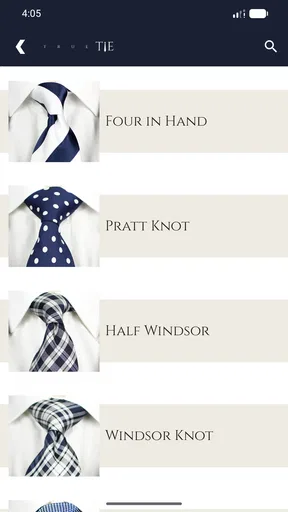
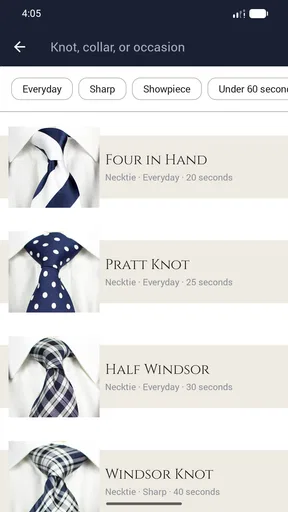
The app provides instructions for several commonly used tie knots, although the exact selection may depend on the version installed and the platform. Typically, guides cover popular options such as the Four-in-Hand, Half Windsor, Full Windsor, and other classic variations. Each knot has a different shape, thickness, and level of difficulty, allowing users to choose a style that matches their collar, occasion, and experience.
Is True Tie: Tie Knot Guide suitable for complete beginners?
Yes. True Tie: Tie Knot Guide is primarily aimed at people who are unfamiliar with tying neckties. Its visual sequence breaks the process into manageable movements instead of assuming that users already understand tie terminology. Beginners should still pay attention to the starting position, the wide and narrow ends, and the direction of each fold. Repeating the instructions slowly usually makes the technique much easier to remember.
Does True Tie: Tie Knot Guide require an internet connection?
The basic knot instructions may be available after installation, but offline access can vary according to the app version, device, and any online content it loads. If you plan to use the guide before an event or while traveling, it is sensible to open the app in advance and confirm that the tutorials load without Wi-Fi or mobile data. Also check whether advertisements or optional features require an active connection.
Is True Tie: Tie Knot Guide free to download, and are there advertisements or in-app purchases?
The availability, advertising, and payment model can differ between the Android and iOS versions and may change with future updates. Before downloading, review the store listing for the current price, included knot guides, advertisements, and any optional purchases. The free version may be enough for casual users, while additional content or an ad-free experience could require payment. Always verify the developer and permissions before installing.


